
Printable GLP-1 tracker
A printable GLP-1 tracker, free to print or save
Some weeks paper is simply easier. This free printable GLP-1 tracker gives you one clean log for each dose, where you injected it, how you felt and your weight, ready to print or save as a PDF. No sign-up and no email needed.
On this page
In short
- This printable GLP-1 tracker is a free, blank log with a row for each day or dose: the date, the medicine and amount as prescribed, the time, the injection site, how you felt, your weight and a note.
- Print it, or choose "Save as PDF" in your browser's print window to keep a copy on your phone or computer.
- It works for any GLP-1 medicine, weekly or daily, injected or taken as a tablet; for a tablet, leave the site column blank.
- Labels ask you to rotate injection sites with each dose, and stomach side effects are most often reported while the dose is being stepped up, so those are the two columns most worth filling in.1,2
- If you would rather not keep paper, Handle keeps the same record in its iPhone app, with free core tracking, with your weight trend and a short daily check-in.
Print your GLP-1 log
Two weeks of rows on one page. Print as many copies as you need; the rest of this page won't print.
My GLP-1 log
| Date | Medicine and amount, as prescribed | Time | Injection site | How I felt | Weight | Notes |
|---|---|---|---|---|---|---|
handlehealth.co · Write down what you took, as prescribed. This log records; your prescriber decides.
Tip: write the medicine and amount exactly as your prescriber wrote them, including the unit. The log records what happened; it is not a place to work out a dose.
How to fill in your GLP-1 tracker
A few seconds a day, or a minute on injection day, is enough.
- 1Date and time
Write the day you took it and roughly when. If a dose was late or missed, write that too; it is part of the record, not a mark against you.
- 2Medicine and amount
Copy it from your prescription or pen label, such as "Mounjaro 5 mg" or "Wegovy 0.5 mg". If your prescriber changes it, the new line shows the change on its own.
- 3
- 4How you felt
One or two words is plenty: none, mild, moderate or severe for nausea, plus anything else you noticed, such as constipation, heartburn or tiredness.
- 5Weight and notes
Weight is optional; if you weigh, the same time of day keeps it comparable. Use notes for anything that changed: a new medicine, a busy week, a question to ask.
Why a GLP-1 log helps
Most people see their prescriber every few weeks or months, and a lot happens in between. A simple log turns "I think the nausea was worse after the increase" into dates you can point to. For tirzepatide, for example, the label reports that most nausea, vomiting and diarrhea happened while the dose was being increased and decreased over time.1
Injection sites are the other reason. Both the Mounjaro and Wegovy labels ask you to rotate sites with each dose,1,2 and a written column is the easiest way to see which one you used last. Our guides to Mounjaro injection sites and Ozempic and Wegovy injection sites explain what the labels say.
Bring the log to your appointment. Our GLP-1 appointment guide has the questions worth asking alongside it.
Free in Handle
The same log, without the paper
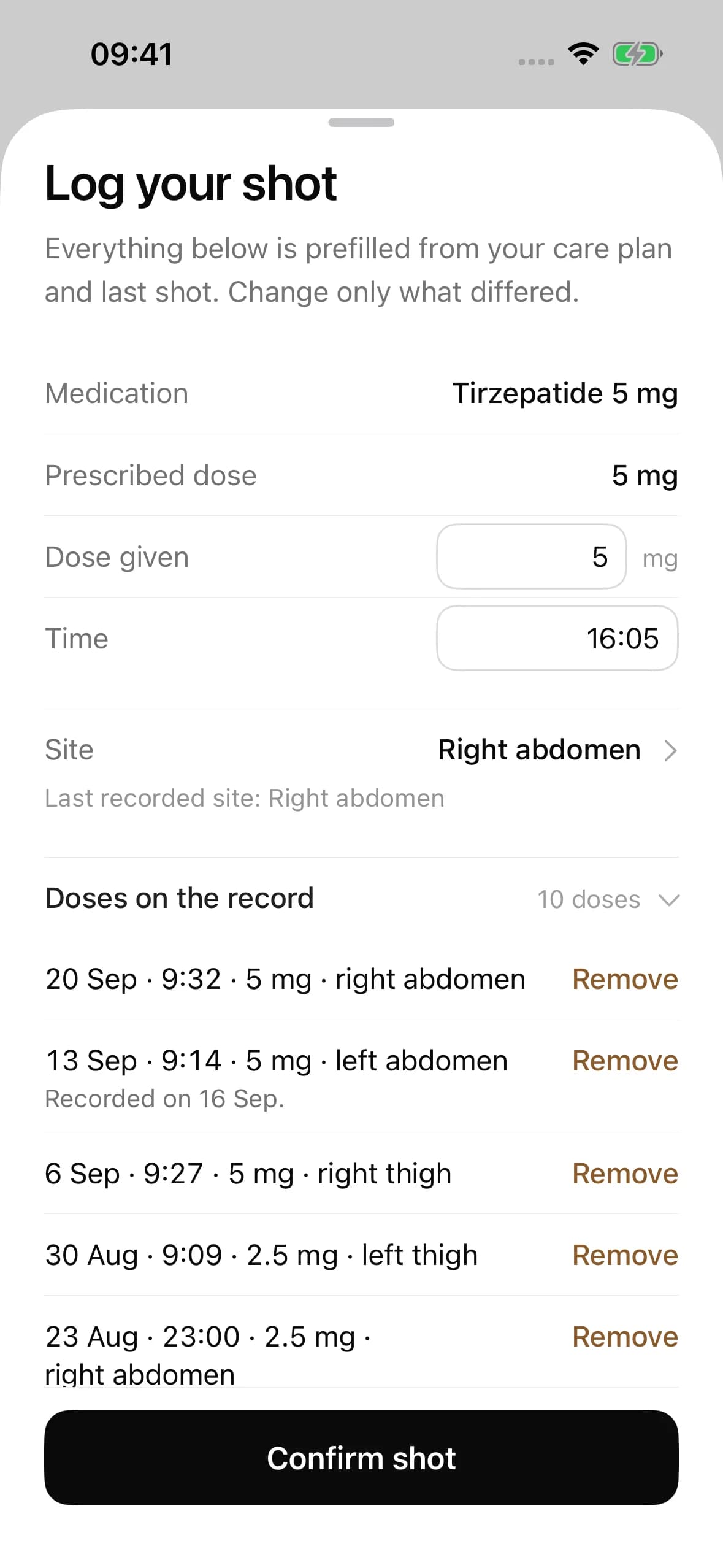
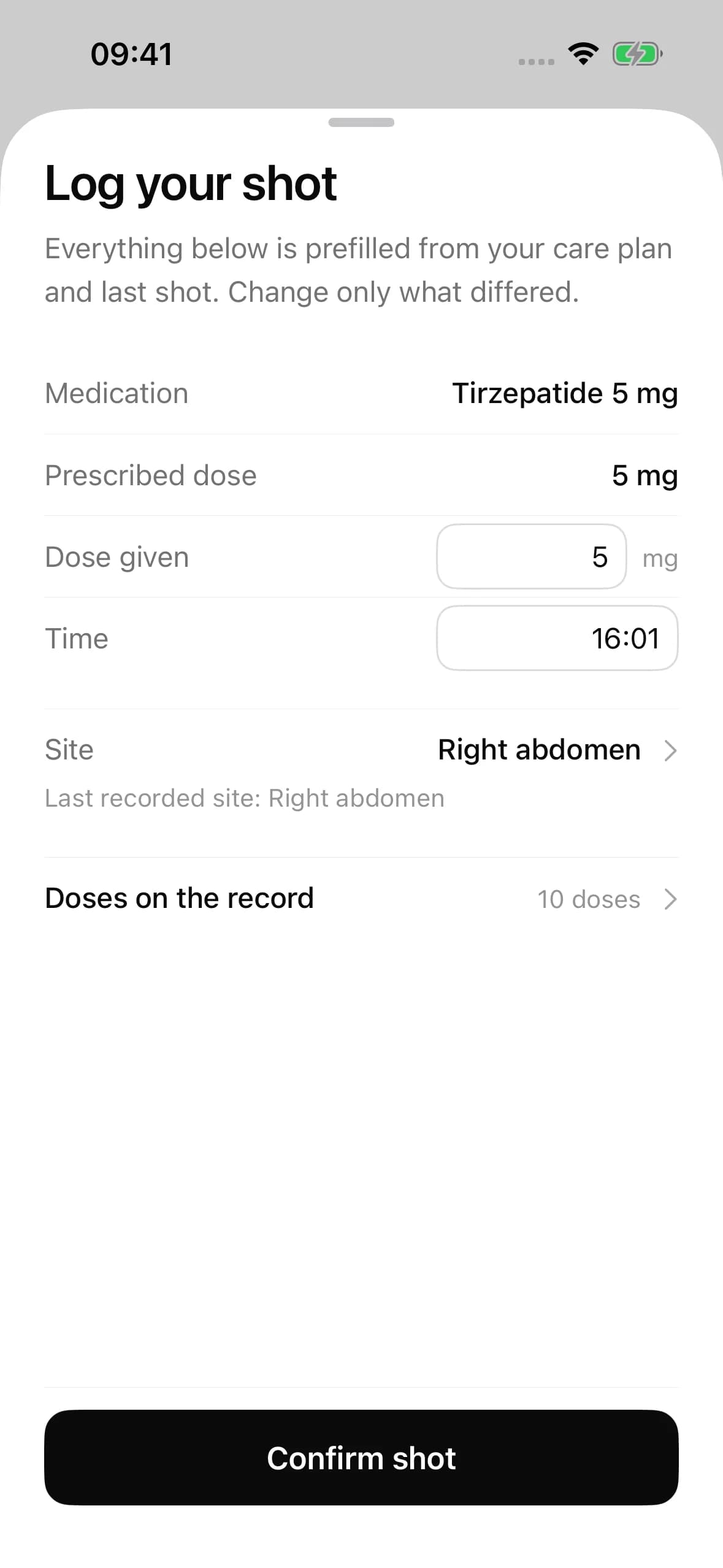
Handle keeps every row of this log for you: your prescribed plan is filled in, so a dose is a tap to confirm and a tap for the site, and Handle shows where you injected last time.
- On the App Store for iPhone
- Forgot to log? Add doses and check-ins for up to 30 days back
- Nothing to lose, smudge or leave at home
Paper log or app?
Both work. The best tracker is the one you keep using.
| Printable log | Handle, free plan | |
|---|---|---|
| Cost | Free | Free |
| Sign-up | None | An email address and a password |
| Dose, time and site | Written by hand | Your plan prefilled; one tap to confirm |
| Symptoms | A word or two per day | A short daily check-in you choose |
| Weight trend | Numbers in a column | Weekly averages, charted |
| Late entries | Squeeze them in | Add up to 30 days back, dated correctly |
| At your appointment | Hand over the sheet | Show your Journey charts |
| Dose advice | None | None, ever |
Free in Handle
See the weeks add up
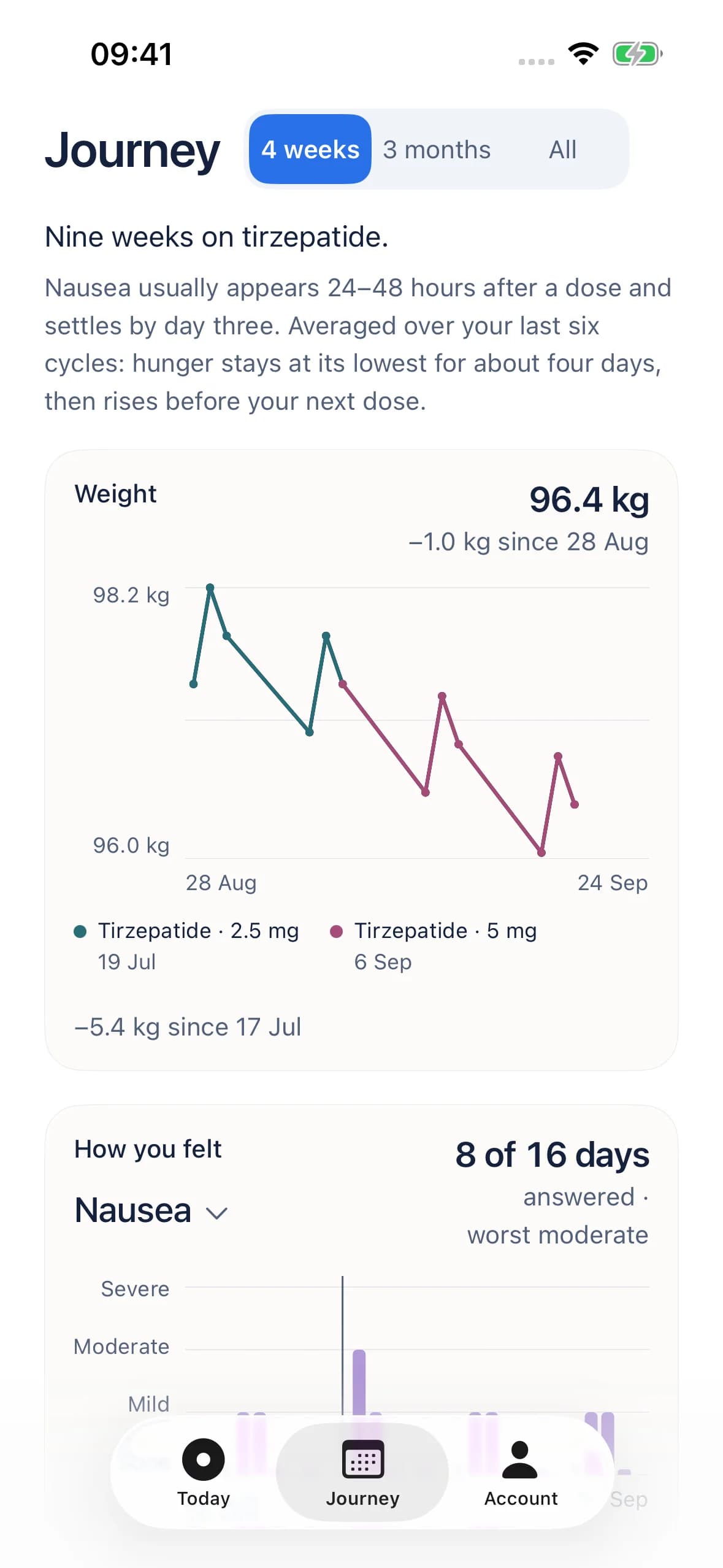
Journey draws your weekly weight trend with your dose as a step line beneath it, next to how you felt and what you ate. It shows them side by side and makes no claims about cause.
Questions people ask
Is there a free printable GLP-1 tracker?+
Yes. The log on this page is free, needs no sign-up, and prints on one page with room for two weeks of entries. Print as many copies as you like, or save it as a PDF from your browser's print window.
What should a GLP-1 log include?+
The date and time, the medicine and amount as prescribed, the injection site for injections, how you felt, and optionally your weight. A notes column catches anything that changed, like a late dose, a new medicine or a question for your prescriber.
Can I save the GLP-1 tracker as a PDF?+
Yes. Press "Print this log" and choose "Save as PDF" as the printer. On a phone, the print window usually offers a way to save or share the page as a PDF instead of printing it.
How do I track injection sites on paper?+
Write the area and the side each time, for example "left abdomen" or "right thigh". Labels ask you to rotate sites with each dose, so glancing at the last few rows before you inject makes it easy to choose a different spot.
Does the tracker work for Mounjaro, Zepbound, Ozempic and Wegovy?+
Yes. It works for any GLP-1 medicine, weekly or daily. For tablets such as the Wegovy pill, Ozempic tablets or Foundayo, leave the injection-site column blank and use one row per day.
Should I write down side effects every day?+
A word or two on most days is enough, especially in the weeks after a dose increase, when stomach side effects are most often reported.1 Consistency matters more than detail.
Can I bring my GLP-1 log to my doctor?+
Yes, and it helps. A few weeks of dated entries answer the questions prescribers usually ask: what you took, when, how you felt and how your weight is trending. See our appointment guide for questions to bring.
Is a paper log or an app better?+
Whichever you will keep using. Paper needs no account; an app like Handle fills in your plan, shows your last injection site, charts your weight and lets you add days you missed. Both record what happened and neither should tell you what dose to take.
Sources
- Eli Lilly and Company, via DailyMed (U.S. National Library of Medicine). Mounjaro (tirzepatide) injection — Prescribing Information, effective August 27, 2026.
- Novo Nordisk, via DailyMed (U.S. National Library of Medicine). Wegovy (semaglutide) injection and tablets — Prescribing Information.
Written by the Handle team from the sources above, last checked on September 24, 2026. How we write: our editorial policy. Spotted something out of date? Tell us at [email protected].
Handle supports recording and conversations with your care team. It does not diagnose, and it never tells you to start, change, skip or stop a dose. This page is general information, not medical advice. Always follow your prescriber and your medicine's instructions for use.